


- Webhooks
- E-Wallet Native Transaction
Webhooks
E-Wallet Native Transaction
The E-Wallet Native Transaction Webhook notifies you in real-time whenever a customer successfully pays via e-wallet (e.g. GoPay, OVO, ShopeePay, etc.) through your checkout session. This allows you to update your order status and fulfill the transaction promptly.
Information
| Method | Path | Format | Authentication |
|---|---|---|---|
| POST | https://your-webhook-url/callback | json | HMAC SHA512 Signature |
This webhook sends a POST request to your configured transaction_notif_url when a customer completes payment via e-wallet native checkout.
Shared Webhook URL: The transaction_notif_url is shared by multiple money-in webhook types: VA Transaction, QRIS, Payment Link Transaction, and E-Wallet Native Transaction. Use the event field to distinguish between them:
"event": "va-transaction"→ Virtual Account payment"event": "qris-acquirer-transaction"→ QRIS payment"event": "payment-link-transaction"→ Payment Link payment"event": "ewallet-native-transaction"→ E-Wallet native payment (this webhook)
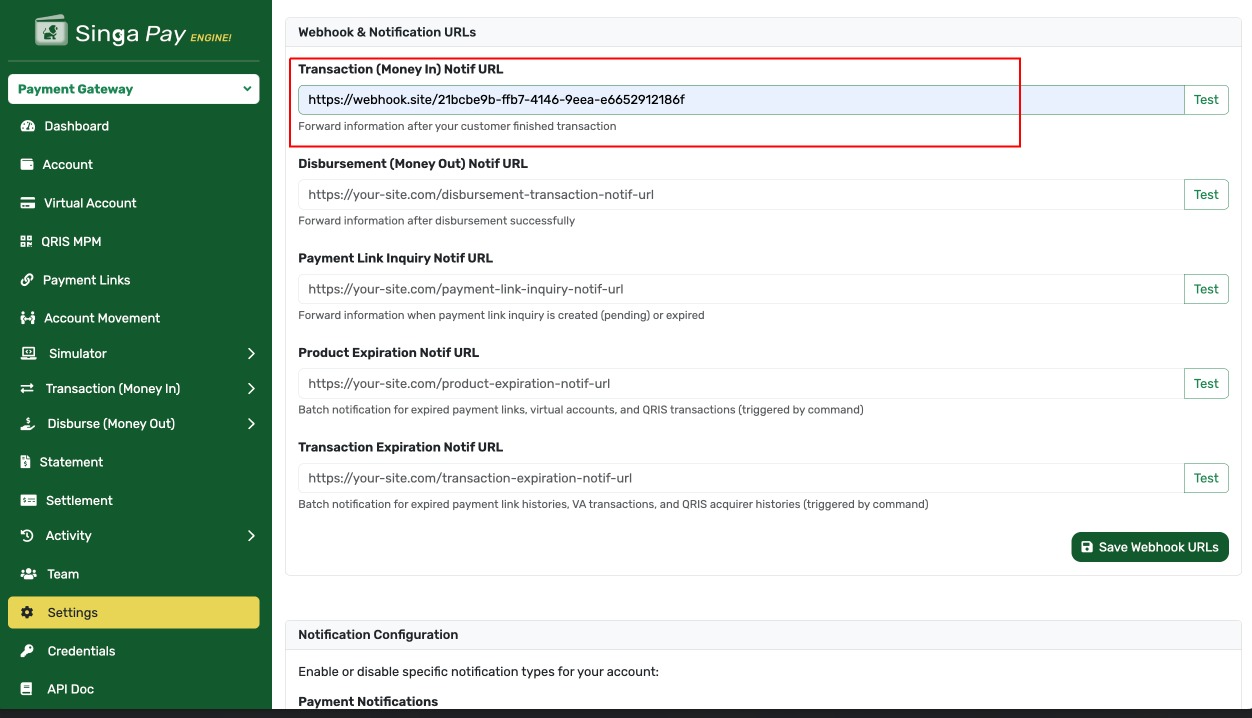
The transaction_notif_url configuration can be accessed from the settings page as shown in the screenshot above.
Request Details
When a customer successfully completes an e-wallet payment, Singa Payment Gateway will send a webhook notification to your registered callback URL. The request includes security headers for verification.
Headers Structure
| Field | Value | Type | Mandatory | Length | Description | Example |
|---|---|---|---|---|---|---|
| Content-Type | application/json | Alphabetic | Mandatory | Specifies JSON format for the request body | application/json | |
| User-Agent | SingaPaymentGateway/1.0 | Alphabetic | Mandatory | Identifies the source of the webhook | SingaPaymentGateway/1.0 | |
| Accept | application/json | Alphabetic | Mandatory | Expected response format | application/json | |
| X-PARTNER-ID | Alphanumeric | Mandatory | Your API Key from the merchant dashboard | pk_live_abc123def456 | ||
| X-Signature | Alphanumeric | Mandatory | 128 | HMAC SHA512 signature for request verification | 5f4dcc3b5aa765d61d8327deb882cf99… | |
| X-Timestamp | Numeric | Mandatory | 10 | Unix timestamp in seconds when the request was sent | 1695711945 | |
| Authorization | Bearer <random_token> | Alphanumeric | Mandatory | Bearer token with random value (system-generated, used as component in signature) | Bearer a1b2c3d4e5f6g7h8i9j0k1l2m3n4o5p6 |
Note: The access token in the Authorization header is a randomly generated string (not a user access token) because this webhook is triggered by the system (payment notification), not by a user action. For signature validation, extract the token from the header and use it as-is in the string to sign. See the Security Mechanisms section below for details.
Body Structure
| Field | Type | Mandatory | Length | Description | Example |
|---|---|---|---|---|---|
| status | Numeric | Mandatory | 3 | HTTP Status Code | 200 |
| success | Boolean | Mandatory | 1 | Indicates if the transaction was successful | true |
| event | String | Mandatory | - | Event type identifier, always ewallet-native-transaction for this webhook | ewallet-native-transaction |
| timestamp | String | Mandatory | - | Event timestamp in format “d M Y H:i:s” | 26 Dec 2025 13:35:45 |
| data | Object | Mandatory | - | Container for transaction, customer, and payment details | - |
| > transaction | Object | Mandatory | - | Transaction details | - |
| >> id | Integer | Mandatory | - | Unique transaction ID | 42 |
| >> reff_no | Alphanumeric | Mandatory | - | Merchant reference number used during checkout creation | INV-2026-001 |
| >> merchant_reff_no | String/Null | Optional | - | Merchant reference number for tracing | INV-2026-001 |
| >> type | String | Mandatory | - | Transaction type, always ewallet | ewallet |
| >> ewallet_vendor | String | Mandatory | - | E-wallet vendor code (e.g. GOPAY, OVO, SHOPEEPAY) | GOPAY |
| >> status | String | Mandatory | - | Transaction status, always paid for this webhook | paid |
| >> amount | Object | Mandatory | - | Net transaction amount (after fees) | - |
| >>> value | Numeric | Mandatory | - | Amount value | 95000 |
| >>> currency | String | Mandatory | 3 | Currency code | IDR |
| >> total_amount | Object | Mandatory | - | Gross transaction amount (what the customer paid) | - |
| >>> value | Numeric | Mandatory | - | Total amount value | 100000 |
| >>> currency | String | Mandatory | 3 | Currency code | IDR |
| >> post_timestamp | String | Mandatory | - | Timestamp when the transaction record was last updated | 26 Dec 2025 13:35:43 |
| >> processed_timestamp | String | Mandatory | - | Timestamp when the payment was confirmed and processed | 26 Dec 2025 13:35:45 |
| > customer | Object | Mandatory | - | Customer details provided during checkout | - |
| >> name | String | Optional | - | Customer name | John Doe |
| String | Optional | - | Customer email address | john@example.com | |
| >> phone | String | Optional | - | Customer phone number | 081234567890 |
| > payment | Object | Mandatory | - | Payment method details | - |
| >> method | String | Mandatory | - | Payment method, always ewallet | ewallet |
| >> vendor | String | Mandatory | - | E-wallet vendor code, same as transaction.ewallet_vendor | GOPAY |
| >> additional_info | Object | Mandatory | - | Payment-specific additional information | - |
| >>> payment_event_id | Numeric | Mandatory | - | Internal payment event ID for traceability | 1042 |
| >>> vendor_reference_no | String | Optional | - | Reference number from the e-wallet vendor (may be null) | PAY-XYZ-12345 |
Body Example
Success: Here’s an example of a successful e-wallet native payment webhook payload.
{
  "status": 200,
  "success": true,
  "event": "ewallet-native-transaction",
  "timestamp": "26 Dec 2025 13:35:45",
  "data": {
    "transaction": {
      "id": 42,
      "reff_no": "INV-2026-001",
      "merchant_reff_no": "INV-2026-001",
      "type": "ewallet",
      "ewallet_vendor": "GOPAY",
      "status": "paid",
      "amount": {
        "value": 95000,
        "currency": "IDR"
      },
      "total_amount": {
        "value": 100000,
        "currency": "IDR"
      },
      "post_timestamp": "26 Dec 2025 13:35:43",
      "processed_timestamp": "26 Dec 2025 13:35:45"
    },
    "customer": {
      "name": "John Doe",
      "email": "john@example.com",
      "phone": "081234567890"
    },
    "payment": {
      "method": "ewallet",
      "vendor": "GOPAY",
      "additional_info": {
        "payment_event_id": 1042,
        "vendor_reference_no": "PAY-XYZ-12345"
      }
    }
  }
}Distinguishing Payloads at Your Endpoint
Since transaction_notif_url is shared across multiple money-in transaction types, use the event field to route the payload correctly in your handler:
<?php
$payload = json_decode(file_get_contents('php://input'), true);

$event = $payload['event'] ?? null;

switch ($event) {
    case 'va-transaction':
        // Handle Virtual Account payment
        handleVaTransaction($payload['data']);
        break;

    case 'qris-acquirer-transaction':
        // Handle QRIS payment
        handleQrisTransaction($payload['data']);
        break;

    case 'payment-link-transaction':
        // Handle Payment Link payment
        handlePaymentLinkTransaction($payload['data']);
        break;

    case 'ewallet-native-transaction':
        // Handle E-Wallet native payment
        handleEwalletNativeTransaction($payload['data']);
        break;

    default:
        // Unknown or future event type
        http_response_code(200);
        exit;
}Security Mechanisms
Overview
To ensure the security and authenticity of webhook requests from Singa Payment Gateway, we provide two recommended security mechanisms. You can choose one or combine both for maximum protection.
Important Note: Signature validation is optional but highly recommended. You can secure your webhook endpoint using either IP whitelisting, signature validation, or both methods together.
Security Options
Option 1: IP Whitelist (Simpler Approach)
This is the simplest security method where you restrict webhook access to only authorized IP addresses from Singa Payment Gateway.
How it works:
- Configure your firewall or application to only accept requests from specific IP addresses
- Singa Payment Gateway will provide you with our official IP addresses
- Any requests from unauthorized IPs will be automatically rejected
Pros:
- ✅ Simple to implement
- ✅ No complex cryptographic operations required
- ✅ Works well for basic security needs
Cons:
- ❌ Less secure if IP addresses are compromised
- ❌ Requires manual updates if our IPs change
- ❌ Cannot verify request integrity (body tampering)
Implementation Example (Nginx):
location /webhook/ewallet-native-transaction {
    # Only allow Singa Payment Gateway IPs
    allow 103.xxx.xxx.xxx;  # Replace with actual IPs from Singa
    allow 103.xxx.xxx.xxx;  # Replace with actual IPs from Singa
    deny all;

    proxy_pass http://your-backend;
}
Implementation Example (PHP):
<?php
// Define allowed IPs (get these from Singa Payment Gateway)
$allowedIPs = [
    '103.xxx.xxx.xxx',
    '103.xxx.xxx.xxx',
];

$requestIP = $_SERVER['REMOTE_ADDR'];

if (!in_array($requestIP, $allowedIPs)) {
    http_response_code(403);
    echo json_encode(['status' => 'error', 'message' => 'Access denied']);
    exit;
}

// Process webhook...
?>Option 2: Signature Validation (Recommended for Higher Security)
This method uses cryptographic signatures to verify that:
- The request actually comes from Singa Payment Gateway
- The request body has not been tampered with during transmission
How it works:
- Singa Payment Gateway signs each webhook request using HMAC-SHA512
- You validate the signature using your Client Secret
- Only requests with valid signatures are processed
Pros:
- ✅ Highest security level
- ✅ Verifies both authenticity and integrity
- ✅ Protects against man-in-the-middle attacks
- ✅ No dependency on IP addresses
Cons:
- ❌ Requires implementation of signature validation logic
- ❌ Slightly more complex to implement
When to use: Production environments, handling sensitive transactions, or when maximum security is required.
See the detailed implementation guide in the “How to Validate Signature” section below.
Option 3: Combined Approach (Maximum Security - Recommended)
For production environments, we strongly recommend using both IP whitelisting and signature validation together.
Implementation order:
- First layer: Check IP whitelist (fast, blocks unauthorized IPs immediately)
- Second layer: Validate signature (ensures request integrity)
Benefits:
- ✅ Defense in depth - multiple security layers
- ✅ Protection against both unauthorized access and tampering
- ✅ Industry best practice for webhook security
Example Implementation:
<?php
// Layer 1: IP Whitelist
$allowedIPs = ['103.xxx.xxx.xxx', '103.xxx.xxx.xxx'];
$requestIP = $_SERVER['REMOTE_ADDR'];

if (!in_array($requestIP, $allowedIPs)) {
    http_response_code(403);
    exit;
}

// Layer 2: Signature Validation
$requestBody = file_get_contents('php://input');
$headers = getallheaders();
$clientSecret = 'your-client-secret';
$endpoint = '/webhook/transaction-notification';

if (!validateWebhookSignature($requestBody, $headers, $clientSecret, $endpoint)) {
    http_response_code(401);
    exit;
}

// Both checks passed - process webhook
$payload = json_decode($requestBody, true);
// ... process transaction ...
?>Which Option Should You Choose?
| Recommended Approach | Reason |
|---|---|
| IP Whitelist only | Simple to implement, easy to debug, suitable for testing environments |
| Signature validation only | Higher security, good for testing signature implementation |
| IP Whitelist + Signature ⭐ | Maximum security, industry best practice, recommended for production |
| IP Whitelist + Signature + Timestamp validation | Additional protection against replay attacks for high-security requirements |
Getting Singa Payment Gateway IP Addresses
To implement IP whitelisting, contact our support team or check your merchant dashboard for the official list of Singa Payment Gateway IP addresses.
Note: We will notify you in advance if our IP addresses change.
How to Validate Signature (Optional but Recommended)
Overview
The X-Signature header is a security mechanism that ensures the webhook request is authentic and comes from Singa Payment Gateway. This signature is generated using HMAC SHA512 algorithm.
Note: While signature validation is optional, we strongly recommend implementing it, especially for production environments, to ensure maximum security and data integrity.
Signature Algorithm: HMAC SHA512
The signature is created using a multi-step process that combines the request method, endpoint, access token, hashed body, and timestamp.
Step-by-Step Validation Guide
Step 1: Extract Headers
Extract the following headers from the incoming webhook request:
- X-Signature - The signature to validate
- X-Timestamp - Unix timestamp (in seconds)
- Authorization - Bearer token (extract the token part)
Step 2: Get Your Client Secret
Retrieve your Client Secret from the merchant dashboard. This is the same secret used for API authentication and is required as the HMAC key for signature verification.
Important: The Client Secret must be kept secure and never exposed in client-side code or logs.
Step 3: Extract Endpoint Path
Extract the endpoint path from your webhook URL. For example:
- Full URL:
https://yourdomain.com/webhook/transaction-notification?param=value - Endpoint:
/webhook/transaction-notification?param=value
The endpoint includes the path and any query parameters.
Step 4: Normalize and Hash the Request Body
The request body must be normalized before hashing to ensure consistent results:
- Parse JSON: Decode the JSON body into an object/array
- Sort Keys Recursively: Sort all object keys alphabetically at every level
- Re-encode JSON: Encode back to JSON with these flags:
JSON_UNESCAPED_UNICODE- Don’t escape Unicode charactersJSON_UNESCAPED_SLASHES- Don’t escape forward slashes
- Hash with SHA-256: Generate SHA-256 hash of the normalized JSON
Step 5: Build the String to Sign
Concatenate the following values with colon (:) as separator:
StringToSign = METHOD + ":" + ENDPOINT + ":" + ACCESS_TOKEN + ":" + HASHED_BODY + ":" + TIMESTAMP
Example:
Method:       POST
Endpoint:     /webhook/transaction-notification
Access Token: a1b2c3d4e5f6g7h8i9j0k1l2m3n4o5p6
Hashed Body:  5f4dcc3b5aa765d61d8327deb882cf99acd3d28e5cf0e661c02c8e8e6e8e6f9a
Timestamp:    1695711945

StringToSign = POST:/webhook/transaction-notification:a1b2c3d4e5f6g7h8i9j0k1l2m3n4o5p6:5f4dcc3b5aa765d61d8327deb882cf99acd3d28e5cf0e661c02c8e8e6e8e6f9a:1695711945
Step 6: Generate HMAC SHA512 Signature
Use your Client Secret as the HMAC key and hash the string to sign:
Calculated Signature = HMAC-SHA512(StringToSign, Client Secret)
Step 7: Compare Signatures
Compare the calculated signature with the signature from the X-Signature header using a constant-time comparison to prevent timing attacks.
Important: Use hash_equals() in PHP, crypto.timingSafeEqual() in Node.js, or hmac.compare_digest() in Python for secure comparison.
if (hash_equals($calculatedSignature, $receivedSignature)) {
    // Signature is valid - process webhook
} else {
    // Signature is invalid - reject request
}Implementation Examples
PHP
<?php

/**
 * Validate webhook signature from Singa Payment Gateway
 */
function validateWebhookSignature($requestBody, $headers, $clientSecret, $endpoint) {
    // Step 1: Extract headers
    $receivedSignature = $headers['X-Signature'] ?? '';
    $timestamp = $headers['X-Timestamp'] ?? '';
    $authorization = $headers['Authorization'] ?? '';

    // Extract access token from "Bearer {token}"
    $accessToken = str_replace('Bearer ', '', $authorization);

    // Step 2: Normalize and hash the request body
    $bodyArray = json_decode($requestBody, true);

    if (json_last_error() !== JSON_ERROR_NONE) {
        return false; // Invalid JSON
    }

    // Sort keys recursively
    function sortRecursive(&$array) {
        ksort($array, SORT_STRING);
        foreach ($array as &$value) {
            if (is_array($value)) {
                sortRecursive($value);
            }
        }
    }

    sortRecursive($bodyArray);

    // Re-encode with specific flags
    $normalizedJson = json_encode($bodyArray, JSON_UNESCAPED_UNICODE | JSON_UNESCAPED_SLASHES);

    // Hash with SHA-256
    $hashedBody = hash('sha256', $normalizedJson);

    // Step 3: Build string to sign
    $method = 'POST'; // Webhooks always use POST
    $stringToSign = "{$method}:{$endpoint}:{$accessToken}:{$hashedBody}:{$timestamp}";

    // Step 4: Generate HMAC SHA512 signature
    $calculatedSignature = hash_hmac('sha512', $stringToSign, $clientSecret);

    // Step 5: Compare signatures using constant-time comparison
    return hash_equals($calculatedSignature, $receivedSignature);
}

// Usage example
$requestBody = file_get_contents('php://input');
$headers = getallheaders();
$clientSecret = 'your-client-secret-from-dashboard'; // Get from merchant dashboard
$endpoint = '/webhook/transaction-notification'; // Your webhook endpoint path

if (validateWebhookSignature($requestBody, $headers, $clientSecret, $endpoint)) {
    // Signature is valid - process webhook
    $payload = json_decode($requestBody, true);

    // Route by event type
    $event = $payload['event'] ?? null;

    if ($event === 'ewallet-native-transaction') {
        $reffNo    = $payload['data']['transaction']['reff_no'];
        $vendor    = $payload['data']['transaction']['ewallet_vendor'];
        $amount    = $payload['data']['transaction']['total_amount']['value'];
        $customer  = $payload['data']['customer'];

        // Update your database, send notifications, etc.
    }

    // Return success response
    http_response_code(200);
    echo json_encode(['status' => 'success']);
} else {
    // Signature is invalid - reject request
    http_response_code(401);
    echo json_encode(['status' => 'error', 'message' => 'Invalid signature']);
}
?>Python
import hmac
import hashlib
import json
from flask import Flask, request, jsonify

app = Flask(__name__)

def sort_dict_recursive(data):
    """Recursively sort dictionary keys"""
    if isinstance(data, dict):
        return {k: sort_dict_recursive(v) for k, v in sorted(data.items())}
    elif isinstance(data, list):
        return [sort_dict_recursive(item) for item in data]
    else:
        return data

def validate_webhook_signature(request_body, headers, client_secret, endpoint):
    """Validate webhook signature from Singa Payment Gateway"""

    # Step 1: Extract headers
    received_signature = headers.get('X-Signature', '')
    timestamp = headers.get('X-Timestamp', '')
    authorization = headers.get('Authorization', '')

    # Extract access token from "Bearer {token}"
    access_token = authorization.replace('Bearer ', '')

    # Step 2: Parse and normalize JSON
    try:
        body_dict = json.loads(request_body)
    except json.JSONDecodeError:
        return False

    # Sort keys recursively
    sorted_body = sort_dict_recursive(body_dict)

    # Re-encode with specific settings
    normalized_json = json.dumps(sorted_body, ensure_ascii=False, separators=(',', ':'))

    # Hash with SHA-256
    hashed_body = hashlib.sha256(normalized_json.encode('utf-8')).hexdigest()

    # Step 3: Build string to sign
    method = 'POST'  # Webhooks always use POST
    string_to_sign = f"{method}:{endpoint}:{access_token}:{hashed_body}:{timestamp}"

    # Step 4: Generate HMAC SHA512 signature
    calculated_signature = hmac.new(
        client_secret.encode('utf-8'),
        string_to_sign.encode('utf-8'),
        hashlib.sha512
    ).hexdigest()

    # Step 5: Compare signatures using constant-time comparison
    return hmac.compare_digest(calculated_signature, received_signature)

@app.route('/webhook/transaction-notification', methods=['POST'])
def webhook_transaction():
    """Handle transaction notification webhook (shared endpoint)"""

    request_body = request.get_data(as_text=True)
    headers = dict(request.headers)
    client_secret = 'your-client-secret-from-dashboard'
    endpoint = '/webhook/transaction-notification'

    if validate_webhook_signature(request_body, headers, client_secret, endpoint):
        payload = json.loads(request_body)
        event = payload.get('event')

        if event == 'ewallet-native-transaction':
            reff_no = payload['data']['transaction']['reff_no']
            vendor  = payload['data']['transaction']['ewallet_vendor']
            amount  = payload['data']['transaction']['total_amount']['value']

            # Update your database, send notifications, etc.

        return jsonify({'status': 'success'}), 200
    else:
        return jsonify({'status': 'error', 'message': 'Invalid signature'}), 401

if __name__ == '__main__':
app.run(port=3000)Important Notes
Best Practices
- Always validate signatures: Never process webhook requests without validating the signature first
- Use constant-time comparison: Prevents timing attacks (use
hash_equals(),crypto.timingSafeEqual(), orhmac.compare_digest()) - Validate timestamp: Check that the timestamp is recent (within 5 minutes) to prevent replay attacks
- Preserve raw body: Don’t parse the JSON before validation - use the raw request body for hashing
- Case sensitivity: The signature is case-sensitive (lowercase hex)
- Character encoding: Use UTF-8 encoding for all strings
- HMAC key: Always use your
client_secretas the HMAC key - Secure storage: Store your Client Secret securely (environment variables, secure vault)
- HTTPS only: Always use HTTPS for your webhook endpoints
Common Mistakes to Avoid
- ❌ Not sorting JSON keys before hashing (order matters!)
- ❌ Using wrong hash algorithm (must use SHA-256 for body, SHA-512 for signature)
- ❌ Wrong separator in string to sign (must use
:, not_or-) - ❌ Using API Key instead of Client Secret
- ❌ Not preserving raw request body (parsing JSON before validation)
- ❌ Using simple string comparison instead of constant-time comparison
- ❌ Wrong order in string to sign (must be: METHOD:ENDPOINT:TOKEN:HASH:TIMESTAMP)
- ❌ Forgetting to extract Bearer token from Authorization header
- ❌ Not including query parameters in endpoint path
- ❌ Processing webhook without validating signature first
Troubleshooting
If signature validation fails:
- Check string to sign format: Must be
METHOD:ENDPOINT:ACCESS_TOKEN:HASHED_BODY:TIMESTAMP - Verify JSON normalization: Keys must be sorted recursively, use correct JSON encoding flags
- Check hash algorithm: SHA-256 for body hash, SHA-512 for HMAC signature
- Verify HMAC key: Must use Client Secret (not API Key)
- Check endpoint path: Must match exactly including query parameters
- Verify timestamp: Should be a valid Unix timestamp in seconds
- Check access token: Extract correctly from Authorization header (remove “Bearer ” prefix)
- Log values for debugging: Log stringToSign, hashedBody, and calculatedSignature (in development only)
Security Considerations
- Prevent replay attacks: Validate that X-Timestamp is recent (within 5 minutes of current time)
- Use HTTPS: Always use HTTPS for webhook endpoints to prevent man-in-the-middle attacks
- Rate limiting: Implement rate limiting on webhook endpoints
- IP whitelisting: Consider whitelisting Singa Payment Gateway IP addresses
- Error handling: Don’t expose detailed error messages to webhook sender
- Idempotency: Handle duplicate webhooks gracefully (use
reff_noto detect duplicates) - Logging: Log all webhook requests (with signatures removed) for audit purposes
Response Requirements
Your webhook endpoint must return an appropriate HTTP response:
Success Response
When the webhook is processed successfully:
Status Code: 200 OK
{
  "status": "success"
}Error Responses
Invalid Signature (401 Unauthorized):
{
  "status": "error",
  "message": "Invalid signature"
}
Processing Error (500 Internal Server Error):
{
  "status": "error",
  "message": "Failed to process webhook"
}
Important: Singa Payment Gateway will retry failed webhooks (non-200 responses) up to 3 times with exponential backoff.
E-Wallet Native Transaction Notes
amountvstotal_amount:total_amountis the gross amount the customer paid.amountreflects the net amount after fees — this is what gets credited to your balance.vendor_reference_no: May benulldepending on the e-wallet provider’s API response. Always handle null gracefully.customerfields: All customer fields (name,email,phone) are optional and depend on the data provided during checkout creation.- Timestamp format: Both
post_timestampandprocessed_timestampare formatted as"d M Y H:i:s"(e.g."26 Dec 2025 13:35:45"), in the application’s configured timezone (Asia/Jakarta / WIB). - Idempotency: Use
reff_noorpayment_event_idto detect and safely ignore duplicate webhook deliveries.